The Real Reason Your UV LED Prints Fail: A Comprehensive Troubleshooting Guide
In the world of industrial printing, UV LED technology was promised as the “set it and forget it” solution. With lower heat output, longer lamp life, and instant on/off capabilities, it revolutionized how we print on plastics, glass, metals, and composites. However, many print shop managers and operators are still plagued by a frustrating reality: prints that peel, colors that shift, or surfaces that remain tacky long after they should have cured.
If you are experiencing these issues, you might be blaming your ink supplier or the printer manufacturer. But the truth is often more complex. The real reason your UV LED prints fail usually boils down to a fundamental misunderstanding of the relationship between chemistry, light energy, and substrate physics. In this guide, we will peel back the layers of UV LED printing failures and provide the technical solutions needed to achieve a perfect cure every time.
1. The Misunderstanding of Curing: Irradiance vs. Energy Density
The most common technical reason for UV LED print failure is the confusion between “brightness” and “total energy.” In UV curing, there are two critical metrics you must monitor:
- Irradiance (Peak Intensity): Measured in mW/cm², this is the “brightness” of the UV lamp at a specific moment. It is responsible for penetrating the ink layer and initiating the chemical reaction.
- Energy Density (Dose): Measured in mJ/cm², this is the total amount of UV energy the ink is exposed to over time. It is a product of irradiance and exposure time (often determined by belt speed or carriage speed).
Many operators assume that if the UV LED lamp is “on” and bright, the print should cure. However, if your belt speed is too fast, the ink may receive high peak irradiance but insufficient energy density. This results in “surface cure,” where the top layer looks dry, but the bottom layer remains liquid, leading to catastrophic adhesion failure.
The Solution: Radiometers
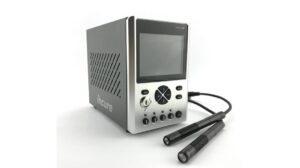
You cannot manage what you do not measure. Using a high-quality UV radiometer is the only way to ensure your lamps are outputting the correct energy levels required by your ink’s technical data sheet. If your mJ/cm² readings are below the ink manufacturer’s specifications, you must either slow down your print speed or increase the lamp power.
2. The Wavelength Mismatch
Unlike traditional mercury vapor lamps, which emit a broad spectrum of UV light (UVA, UVB, UVC), UV LED lamps emit a very narrow “monochromatic” band of light, typically centered at 365nm, 385nm, 395nm, or 405nm.
The failure occurs when the ink chemistry does not match the lamp’s wavelength. UV inks contain photoinitiators—chemicals that absorb light and start the polymerization process. If your ink is optimized for a 365nm lamp but you are using a 395nm lamp, the photoinitiators will not “see” the light efficiently. This leads to incomplete polymerization, making the print brittle or prone to chemical sensitivity.
The Solution: Technical Alignment
Always verify the spectral requirements of your ink. Most modern UV LED inks are formulated for 395nm, but specialty glass or hard-coat inks might require different wavelengths. Ensure your lamp and ink are a matched pair.
3. Substrate Surface Tension and “Dyne” Levels
Sometimes the print doesn’t “fail” because of the light; it fails because the ink never properly bonded with the material. This is a matter of surface energy. For an ink to stick, the surface energy of the substrate (measured in dynes/cm) must be significantly higher than the surface tension of the liquid ink.
Common substrates like polypropylene, polyethylene, and certain powder-coated metals have very low surface energy. When the ink hits these surfaces, it “beads up” (reticulation) rather than spreading out. Even if you cure it with the strongest UV lamp in the world, the ink will eventually flake off because there is no molecular bond.
The Solution: Surface Pre-treatment
To fix adhesion failures related to surface tension, consider the following:
- Corona Treatment: An electrical discharge that increases the surface energy of plastics.
- Flame Treatment: Briefly passing a flame over the substrate to oxidize the surface.
- Chemical Primers: Applying a liquid “wipe-on” primer that acts as a bridge between the substrate and the ink.
- Dyne Pens: Use these testing tools to measure the surface energy before you start a production run.
4. Oxygen Inhibition: The “Tacky” Surface Problem
Have you ever pulled a print out of the machine only to find it feels slightly sticky or “tacky” to the touch? This is often caused by oxygen inhibition. Oxygen in the air can interfere with the free-radical polymerization process that UV LED inks use. It essentially “steals” the energy from the photoinitiators at the very surface of the ink film.
Because UV LED lamps lack the short-wave UVC light that traditional mercury lamps provide (which helps overcome oxygen inhibition), this problem is more prevalent in LED systems.
The Solution: Nitrogen Inerting or Increased Irradiance
High-end industrial printers sometimes use nitrogen inerting, which replaces the oxygen at the curing site with nitrogen gas. For most standard shops, however, the solution is to increase the peak irradiance (mW/cm²) at the surface or use inks specifically formulated with higher concentrations of surface-cure photoinitiators.
5. Temperature and Humidity: The Silent Variables
The environment in your print room plays a much larger role than most realize. UV LED printing is a chemical reaction, and chemical reactions are sensitive to temperature.
- Cold Temperatures: If your substrate or ink is too cold, the viscosity of the ink increases. This can lead to poor “wet-out” on the substrate and head strikes. Furthermore, the chemical reaction of curing slows down in cold environments.
- High Humidity: Moisture in the air can settle on the substrate as a microscopic layer of “fog.” This creates a barrier between the ink and the substrate, leading to peeling. Humidity can also affect the electronics of the UV LED heads, causing premature diode failure.
The Solution: Climate Control
Maintain a stable environment. Ideally, your print room should be kept between 20°C and 25°C (68°F – 77°F) with a relative humidity between 40% and 60%. Avoid placing your printer near bay doors or HVAC vents where temperature fluctuations are extreme.
6. Maintenance Neglect: Dirty Lenses and Aging LEDs
While UV LED lamps last a long time (often 20,000+ hours), they are not immortal. Their output gradually declines over time. More importantly, the quartz glass lens protecting the LEDs can become clouded with ink mist, dust, or grease.
Even a thin film of ink overspray on the lamp lens can block 50% or more of the UV output. This results in “undercured” prints that look fine initially but fail a scratch test or tape test later.
The Solution: A Strict Maintenance Schedule
Clean your UV LED lamp lenses daily using the manufacturer-recommended solvent (usually Isopropyl Alcohol). Additionally, perform a weekly “output check” with your radiometer to track the degradation of the LEDs. If you notice a 20% drop in energy compared to when the lamps were new, it’s time to adjust your speeds or plan for a lamp replacement.
7. Ink Layer Thickness and Pigment Loading
The “Real Reason” for failure in high-quality graphic applications is often the ink itself. Black and white inks are notoriously difficult to cure. Black ink absorbs UV light (preventing it from reaching the bottom of the layer), and white ink reflects UV light.
If you are printing a very thick layer of black ink at high speed, the UV light may never reach the “anchor” layer where the ink meets the substrate. The result is a print that looks perfect but can be wiped off with a finger.
The Solution: Layer Management
When printing high-density blacks or heavy white underbases, you must decrease the print speed or increase the UV power. Some RIP (Raster Image Processor) softwares allow you to adjust the “curing delay” or “multi-pass curing,” giving the ink more time under the light to ensure deep penetration.
8. Substrate Outgassing
Certain materials, particularly cast acrylics, polycarbonates, and some PVCs, “outgas.” This means they release trapped air or chemicals when they are heated or when the UV reaction occurs. If the ink cures too quickly on top of an outgassing substrate, the trapped gas creates tiny bubbles or “pinholes” in the print, eventually leading to the ink delaminating from the surface.
The Solution: Acclimation and Slow Curing
Ensure your substrates are acclimated to the room temperature for at least 24 hours before printing. In some cases, a light “pre-bake” or a slower curing cycle can allow the gases to escape before the ink film becomes too rigid to move.
Summary Checklist for Troubleshooting UV LED Failures
If your prints are failing, work through this checklist systematically to identify the root cause:
- Check the Radiometer: Is the lamp outputting the required mW/cm² and mJ/cm²?
- Verify the Wavelength: Does the ink’s photoinitiator peak match the lamp’s output (e.g., 395nm)?
- Test the Surface Energy: Use a Dyne pen. Is the substrate’s surface energy at least 10 dynes higher than the ink?
- Inspect the Lens: Is the quartz glass on the UV lamp crystal clear?
- Evaluate the Environment: Is the room too cold or too humid?
- Review the Ink Expiry: Is the ink past its shelf life? (UV ink components can separate or degrade over time).
- Perform a Tape Test: Use 3M 610 tape to check adhesion immediately after curing and again 24 hours later (some inks require a “post-cure” period).
Conclusion: Mastering the Science of the Cure
UV LED printing failure is rarely the result of a single “bad” component. Instead, it is usually a breakdown in the harmony between the light, the chemistry, and the surface. By moving away from guesswork and toward a data-driven approach—using radiometers, dyne tests, and strict maintenance protocols—you can eliminate 99% of print failures.
Understanding that UV curing is a complex chemical reaction rather than just a drying process is the first step toward becoming a master of the craft. When you control the variables, you control the quality of the output, ensuring that every print that leaves your shop is durable, vibrant, and built to last.
Investing in high-quality UV LED equipment and staying educated on the latest ink formulations will keep your business ahead of the curve. Don’t let a simple lack of measurement be the reason your prints fail.
Visit www.blazeasia.com for more information.